
Table of Contents
The use of custom filters to protect an application against XSS injection is considered a bad practice, although it remains common. Such filters are generally insufficient to prevent malicious user inputs from compromising the security of the application.
The following case study describes a “simple” filter encountered during a penetration test, along with the reasoning required to bypass this filter and exploit the reflected cross-site scripting (XSS).
XSS injection : vulnerability lab
Before diving into the details of the encountered filter and the bypass solutions, we encourage testing this reflected XSS through downloading this HTML file:
The username parameter in the URL serves as the injection point for testing payloads.
Exploitation of XSS vulnerability
The demonstration of XSS injection relies on the code provided in the previous section.
XSS filter injection’s context discovery
As with all reflected XSS injections, the first step of discovery is to examine the context in which the user input is injected, determine which special characters are allowed, which are disallowed (removed), and which are escaped and how.
XSS injection context
User input is injected in two locations on the page, as illustrated below:
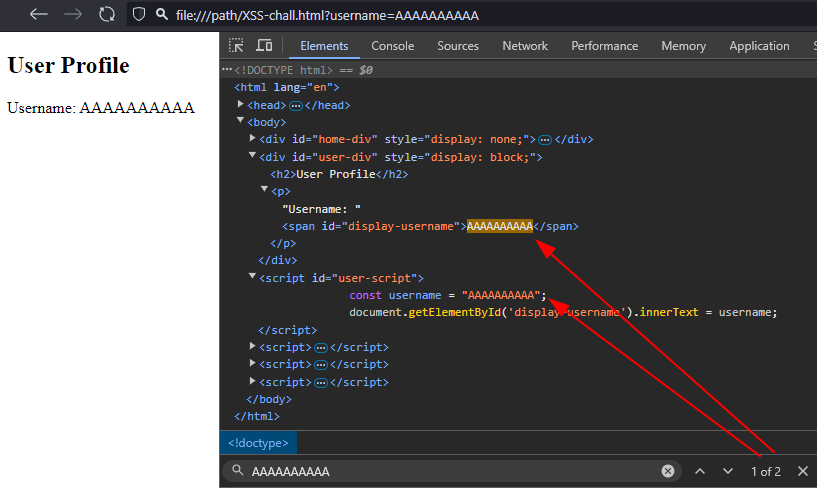
The analysis of the JavaScript code reveals that the injection into the <span> tag uses innerText. This method automatically escapes HTML characters, making injection impossible here.
However, the second injection point occurs within a string in a <script> tag, in the definition of the username variable. Breaking out of this string allows for the execution of arbitrary JavaScript code.
Processing of user input
To craft a functional injection, it is necessary to examine how the user input is processed. In this case, the processing is performed client-side, so simply reading the JavaScript code reveals the behavior. If it were performed server-side, testing would be required to discover how each special character is handled.
function escapeXss(input) {
    return input.replace(/"/g, '\\"').replace(/\//g, '\\/');
}

const params = new URLSearchParams(window.location.search);
const usernameParam = params.get('username');
const escapedUsername = usernameParam ? escapeXss(usernameParam) : 'ANONYMOUS';

var script = document.getElementById("user-script")
script.innerText = script.innerText.replace("PLACEHOLDER",escapedUsername)
eval(script.innerText)Two treatments are applied to the user input before reinjecting it into the script tag:
"is replaced by\", preventing the escape of the string ;/is replaced by\/, blocking the creation of closing HTML tags and JavaScript comments.
Crafting a functional payload for XSS injection
Escaping the string
The first step in crafting the payload relies on a common filter bypass: " is escaped by adding \ before it, but the \ itself is not escaped. Therefore, the input \" becomes \\\". The added \ is escaped, and the " is interpreted again to close the string. Testing this in the lab leads to a JavaScript syntax error:
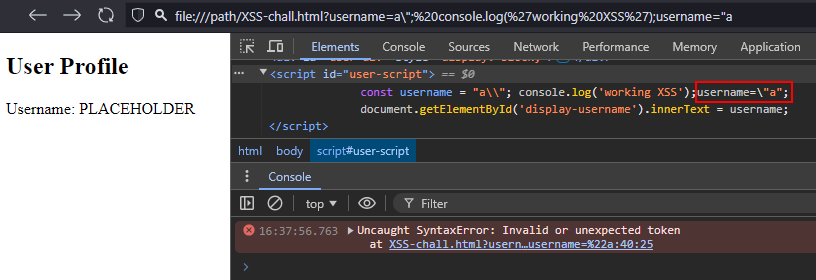
The \ added before the final " in the payload — which allows reopening the string so that the existing " in the script does not cause issues — is not within a string and is invalid in JavaScript syntax. The injected code is not interpreted but instead throws an error in the console.
Commenting out remaining JavaScript
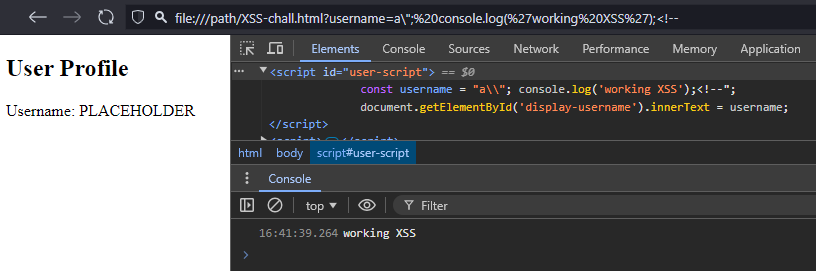
A solution to address this error is to comment out the rest of the line so that the closing " of the string is no longer interpreted. However, JavaScript comments (whether // or /* ... */) begin with /, which poses the same syntax problem as ", since the filter prepends them with \.
The trick to use is less common than the \/<!--
Avoiding custom filters to prevent XSS injection and XSS filter evasion properly
As explored and proven in this case study, using custom filters to protect applications is ineffective and not recommended. Modern programming languages and frameworks provide specific functions that ensure optimal protection against injections. These tools should be favored to guarantee robust security and reduce the risks associated with XSS vulnerabilities or other types of injections.
Author
Amos GEORGE, Audit & Offensive Security, I-TRACING
10 February 2026